Telegram Bot Not Working? Fix It Fast
telegram bot not working? diagnose rate limits, webhooks, permissions, and message failures with this practical troubleshooting guide for copy trading bots.
You're watching a trader on fomo. You tap the command. Nothing comes back. No confirmation, no error, no position update. You send it again, and now you don't know if you've done nothing or done it twice. That uncertainty is the problem when a Telegram Bot Not Working issue hits mid-session. The fix starts with naming what failed, not restarting things at random.
Table of Contents
- Why Your Telegram Bot Goes Silent
- Telegram API Limits That Look Like Outages
- How to Diagnose the Real Problem
- Permission and Account Mode Checks
- Reading 429 and 5xx Error Responses
- Recovery Steps for Copy Trading Bots
- Frequently Asked Questions
Why Your Telegram Bot Goes Silent
A bot was replying all morning. Then the market moved, alerts stacked up, and the chat went quiet. The bot avatar still looks fine. Your messages show as sent. You have no way to tell from the chat window alone whether a trade happened.

Most guides blur three different failures into one checklist. Separate them first.
The Three Failure Modes
- Silent message loss: Your command never reached the bot, or the bot's reply never reached you. Nothing executed because nothing arrived.
- Delayed execution: The command arrived and sat in a queue. It may still run, later than you intended.
- User-interface failure: The action executed, but the confirmation didn't render or deliver. Your wallet moved. Your chat didn't.
Each one demands a different response. Resending helps the first. Resending the third can duplicate a trade. Waiting helps the second only if you're willing to accept a late fill at a worse moment.
First question to ask: Was the action never received, received but not executed, or executed without a Telegram confirmation.
Generic uptime checks don't answer that. A process can be alive while messages drop, and guidance on silent bot failures notes webhook bots may miss events during an API outage without Telegram backfilling them. That's a materially worse risk than a slow reply, because a missed exit doesn't arrive late. It doesn't arrive.
Traders layering other tools onto Telegram hit the same wall. A PostPulse Telegram white-label flow or any connected surface still depends on the same delivery path, so a delivery gap looks identical everywhere. Before blaming your setup, check whether the silence is delivery, delay, or display. If alerts specifically are missing while commands work, the breakdown in this guide to fomo app notification problems covers that narrower case.
Telegram API Limits That Look Like Outages
A healthy bot can look dead because it hit a documented ceiling. Telegram doesn't guarantee unlimited throughput. It throttles, and throttling from your side reads as silence.
The Numbers That Matter
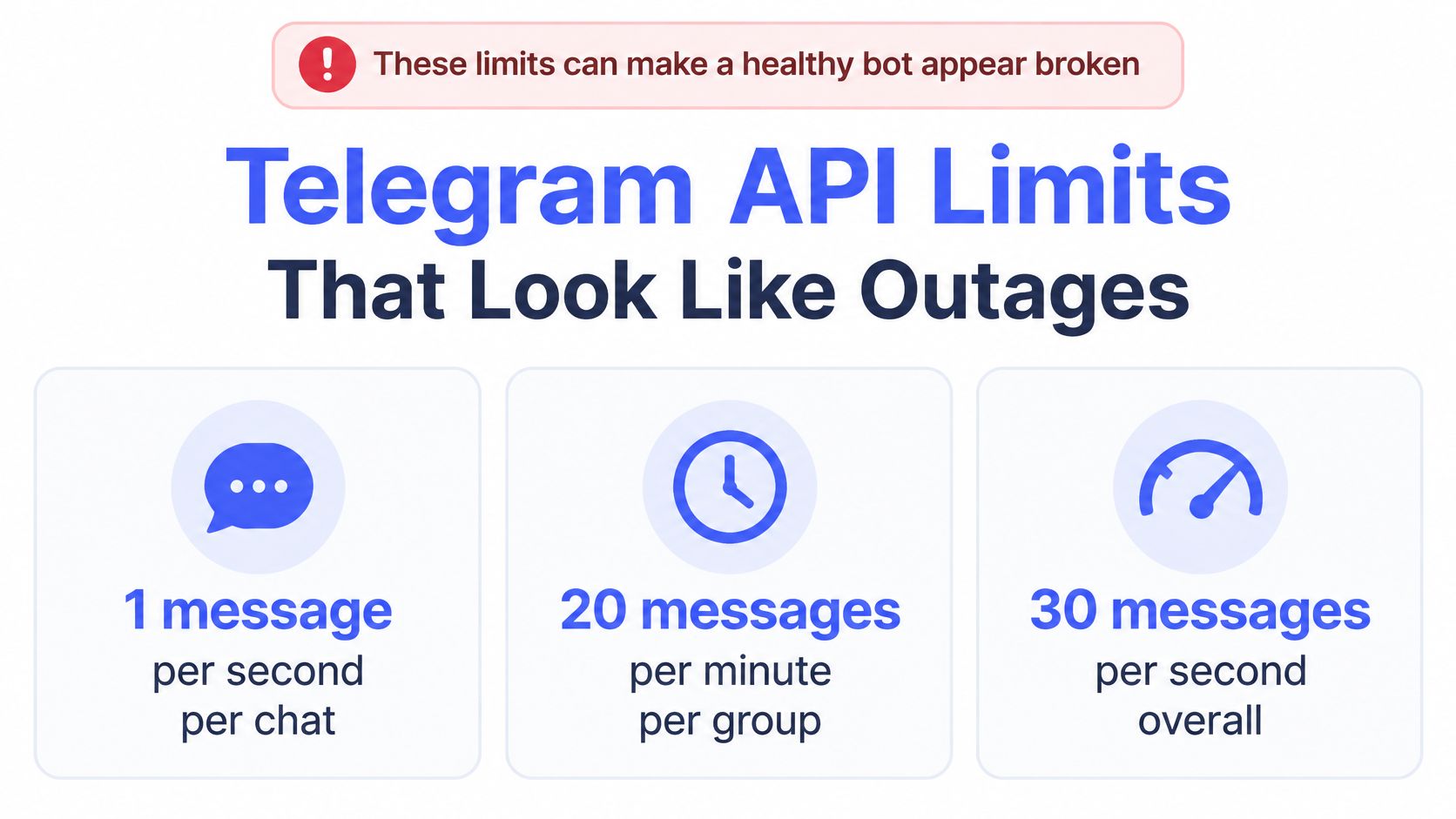
- Single chat: A bot should avoid more than 1 message per second in one chat, per Telegram's official Bot FAQ on message limits.
- Group chats: The same FAQ sets a separate ceiling of 20 messages per minute in groups.
- Bulk sending: Free broadcasting tops out at roughly 30 messages per second across recipients.
Short bursts may pass. Sustained excess produces HTTP 429 errors, and the bot stops replying until the pressure clears. That's not a crash. It's enforcement.
Now map that to a volatile session. A copy trading service sends trade confirmations, status updates, alerts, and execution receipts to many users at once, often in the same second a popular trader moves. Every recipient wants the receipt immediately. The bot's aggregate volume can cross the bulk ceiling even though your individual chat looks quiet. You see a missing confirmation. The operator sees a queue backing up behind a rate limit.
What This Looks Like From Your Chair
Replies arrive in clumps after a pause. Commands sent during the pause seem ignored, then several responses land together. Tapping the same button repeatedly makes it worse, because each tap adds work to a throttled queue.
Before assuming an outage on your end, it's worth a quick look at broader service health to browse current outages and see if others are degraded too. If only your bot is quiet and the market is busy, throttling is the likelier story.
Telegram does sell headroom. Paid broadcasting can raise the bulk rate substantially, but access requires a large Stars balance and a large monthly active user base, so it's an operator decision, not something you can switch on. Your practical baseline stays the three numbers above. If your usage pattern plausibly exceeds them, you're probably looking at a limit, not a broken bot.
How to Diagnose the Real Problem
Don't guess. Work from the outside in, separating transport failure from application failure. Transport means messages can't move between Telegram and the bot. Application means they move fine and the bot mishandles them.
A Four Step Sequence
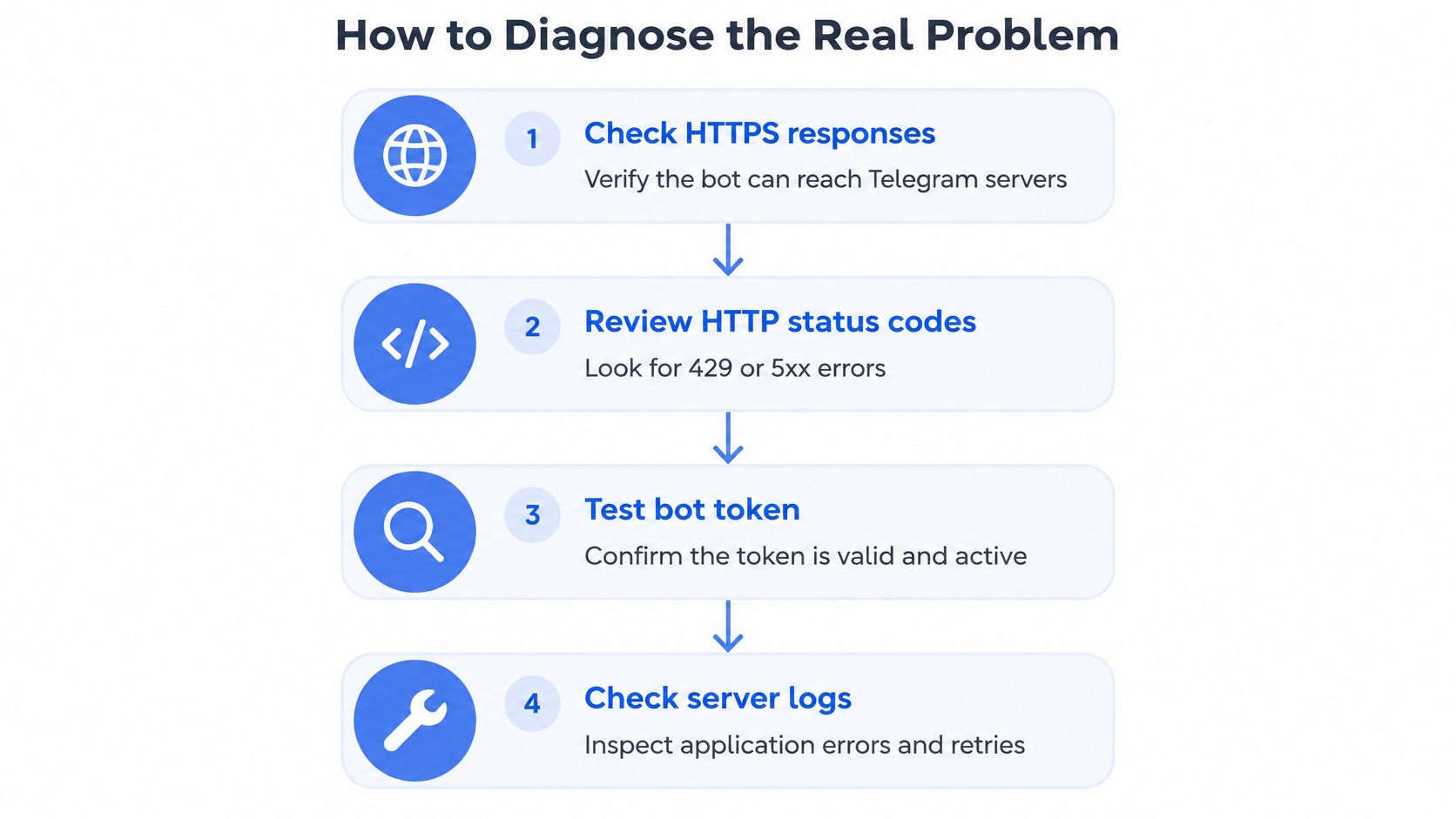
- Check HTTPS responses: Confirm the bot can reach Telegram at all. No response means transport, full stop.
- Review HTTP status codes: A 429 points to volume. A 5xx points upstream. Different problems, different fixes.
- Test the bot token: An invalid or revoked token fails from the user's side. Verify it before touching anything else.
- Inspect server logs: Look for crashed handlers, retry loops, and where processing stopped.
Update backlog is the step people skip. The official Bot API documentation on update retrieval states that update requests accept a limit from 1 to 100, with 100 as the default maximum per call. A bot using long polling or a webhook has to keep acknowledging events at that pace. Fall behind, and commands process late or not at all while the process still reports healthy.
Payload size is the other silent killer. The same documentation caps rich message text at 32,768 UTF-8 characters, formatted messages at 500 blocks, nesting at 16 levels, and a message at 50 media attachments or 20 table columns. Oversized transaction logs, verbose error traces, and multi-asset status reports can breach those ceilings. The bot is fine. The message is undeliverable.
This walkthrough shows the diagnostic flow applied in order.
Correlate Before You Act
Match three records: the Telegram update ID, the application log entry, and the transaction hash. Update ID with no log entry means it never got processed. Log entry with no hash means received but not executed. Hash with no confirmation means executed and the interface failed. If you're moving a bot to new infrastructure during this process, an AI bot deployment guide is a useful reference for keeping the deployment side clean. Traders hitting the app layer instead can cross-check against common fomo app failure patterns to rule the phone out.
Permission and Account Mode Checks
The bot answers in a private chat. You add it to a group and it ignores everything. Or it worked for months and stopped after you connected a Business account. That's rarely an execution outage. It's a permissions mismatch wearing an outage's clothes.
Groups Are Not Private Chats
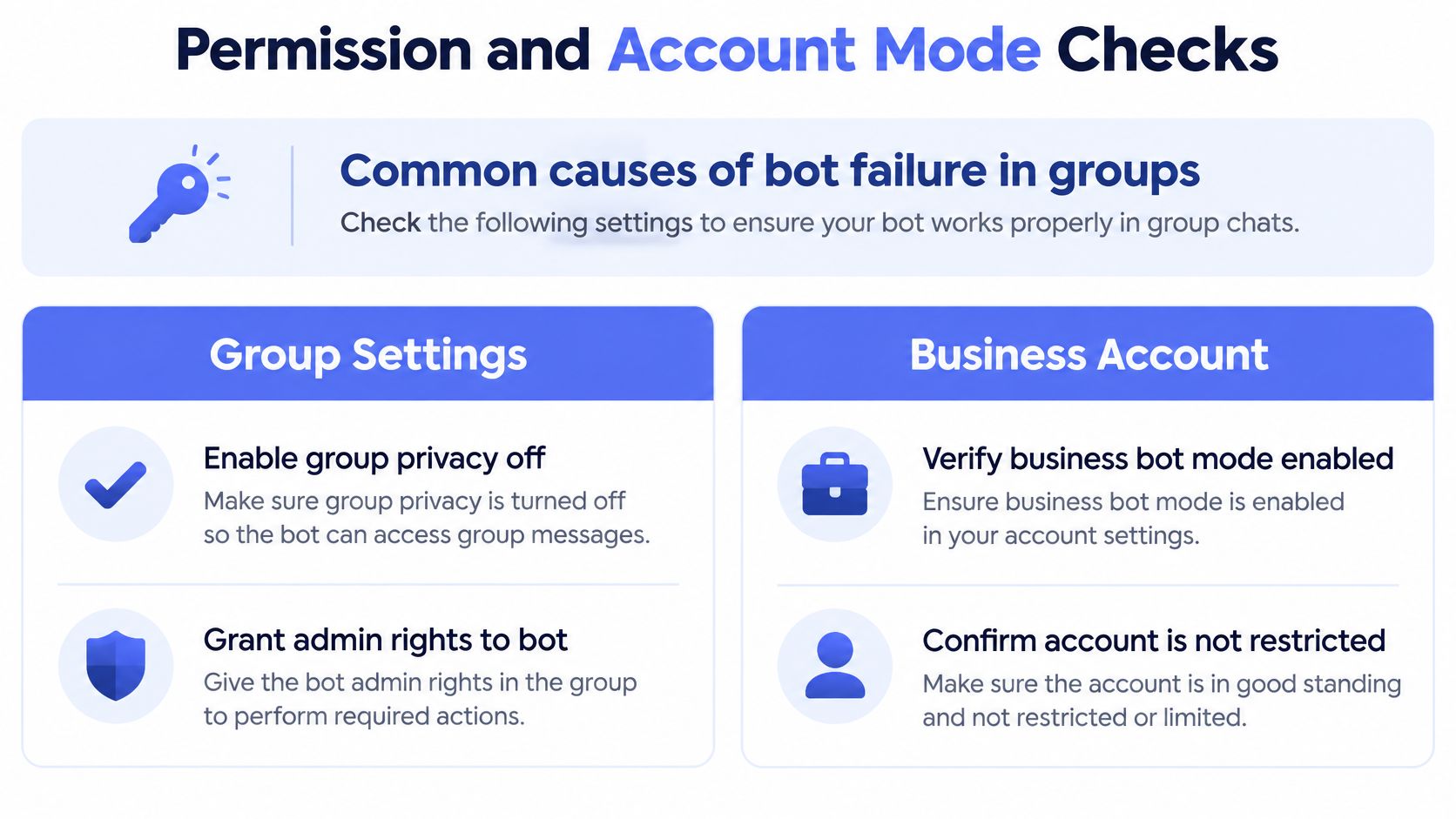
Bots in groups operate under privacy mode and admin settings that don't apply in direct messages. With privacy mode on, a bot may only see commands addressed to it and replies to its own messages, not general chat traffic. Without the rights it needs, it can't read, post, or act, and it won't necessarily tell you why.
- Privacy setting: Check whether group privacy is blocking the messages you expect the bot to see.
- Admin rights: Confirm the bot holds the specific permissions its actions require, not just membership.
- Chat by chat variance: Test the same command in a private chat. If it works there, the bot is healthy and the group config is the fault.
Business Account Mismatches
Telegram's platform keeps moving. Recent Bot API changes expanded Business account functionality and new rights structures, and Telegram's BotNews announcement on business bot changes sits alongside documentation stating only one business bot may currently be connected to a user account. Connect an unsuitable bot and you can hit a specific BOT_BUSINESS_MISSING error.
A permissions or account mode change can look exactly like an execution outage while the bot process stays perfectly healthy.
That matters for unattended automation. You set up copying, walk away, and a scope change narrows what the bot is allowed to do. Entries might still post while a restricted action fails, or the whole connection degrades without a visible crash.
Work it methodically. Inspect the actual permissions granted, read the exact error returned instead of treating all silence as identical, and confirm the bot supports the account mode you're connecting. Don't repeatedly reconnect or resend commands hoping it clears. That churns state without fixing scope. Keep a fallback path that preserves your control, meaning you can pause automation and act manually while permissions get sorted.
Reading 429 and 5xx Error Responses
Two error families explain most cases where a Telegram Bot Not Working complaint turns out to be something else. They look similar in a frozen chat. They mean opposite things.
429 Means Slow Down
An HTTP 429 means the bot hit a rate limit. The response carries a parameters.retry_after value stating how many seconds to wait before retrying, as described in this breakdown of Bot API limits and 429 handling. That same guidance puts the practical ceilings at about 30 messages per second across a bot, one per second in a private chat, and 20 per minute in a group.
The correct response is patience with structure. Respect the returned wait time. Queue outgoing messages. Apply exponential backoff and per-chat rate controls so one busy conversation doesn't starve the rest. Retrying instantly just earns another 429 and extends the silence you're trying to end.
5xx Means Look Upstream
An HTTP 5xx from a direct Bot API request points to a service-side problem, while a 429 points to request volume, a distinction spelled out in monitoring guidance for the Telegram Bot API. With a 5xx, restarting your bot accomplishes nothing. Telegram's infrastructure or the path to it is degraded, and your job is to wait and avoid making state changes you'll have to untangle later.
| Signal | Meaning | Your move |
|---|---|---|
| 429 | Rate limit reached | Wait per retry_after, queue, back off |
| 5xx | Service-side problem | Hold position, don't restart blindly |
Decision rule: 429 means your side sent too much. 5xx means their side can't answer.
Status pages and third-party monitors report operational status and incident history, which helps with context. They aren't substitutes for checking your bot's actual API response. Regional degradation can slow your connection while a global status page shows green. Trust the response code your own request returned over a dashboard built from someone else's vantage point.
Recovery Steps for Copy Trading Bots
Copy trading raises the stakes on every failure above. A missed confirmation is an inconvenience. A missed exit is a position you thought was closed, still open, moving against you. Recovery has to establish ground truth before it touches anything.
The Recovery Sequence
- Confirm the process is alive: A dead backend explains everything and nothing else matters until it's running.
- Check delivery mode: Verify webhook health or polling status, and look for a conflict where updates go somewhere you aren't watching.
- Read recent API responses: Sort the last stretch into 429s, 5xx responses, or clean calls. That tells you whether to slow down, wait, or dig into the application.
- Correlate the trade: Match update IDs against transaction hashes and nonce or status data to settle whether the swap landed on-chain.
Step four is where traders either protect themselves or double their problem. If a hash exists, the trade executed regardless of what Telegram showed you. The confirmation failed, not the trade. If no hash exists and the log shows the command arrived, you're looking at an execution failure inside the bot. If neither exists, the command never arrived and resending is safe.
Never replay an order to find out whether the first one worked. Check the chain first. The chain doesn't care what your chat displayed.
Blind replay is the most expensive habit in bot recovery. It converts an interface failure, which costs you nothing, into a doubled position, which can cost plenty. A sound recovery policy verifies on-chain status first, then decides. For background on how these bots are structured, this overview of Telegram bot trading setups covers the moving parts.
One structural point limits the damage when things go wrong. A non-custodial setup keeps funds in your own wallet under a revocable allowance, so a misbehaving or silent bot doesn't hold your assets hostage. You can revoke permissions, pause copying, and close positions yourself. That fallback is worth more during an outage than any status message.
Frequently Asked Questions
Can a Bot Work in One Chat and Fail in Another
Yes, and it's common. Private chats, groups, and Business connections run under different permission and rate limit rules. A command that succeeds in a direct message can fail in a group because of privacy mode, missing admin rights, or the group message ceiling. Treat chat-specific failure as a configuration signal, not a bot failure.
What Should I Do After a Telegram Update Breaks Things
Check account mode and permission scope before anything else. Platform changes can alter what a previously reliable bot is allowed to do, and the symptom looks like an outage. Read the specific error returned, confirm the bot supports your connection type, and avoid repeated reconnect attempts while you diagnose.
How Do I Tell if a Trade Executed Without Confirmation
Find the transaction hash. Match the Telegram update ID to the application log, then check for a corresponding on-chain transaction and its status. A confirmed hash means the trade happened and only the message failed. No hash after a logged command means it didn't execute.
Is Restarting the Bot Ever the Right Fix
Sometimes. Restart when the process is stuck, crashed, or no longer processing updates. Don't restart in response to a 429, where the fix is waiting, or a 5xx, where the problem is upstream. Restarting a healthy bot during a platform degradation just adds a reconnection backlog to someone else's outage.
If you're tired of babysitting confirmations, copyfomo mirrors the filled entries and exits of top traders on fomo directly in Telegram, non-custodially, so your funds stay in your wallet and you can revoke access anytime. Copy trading carries risk and past performance does not predict results, so size accordingly. Visit the site to start the bot on Telegram and set your own limits before the first trade copies.
stop reading. start copying.
pick a trader from the fomo leaderboard, set your size, and the entries and the exits land in your own wallet while you sleep.
open copyfomo on telegram →