Non Custodial Wallet Explained: Keys, Allowances and Risk
how a non custodial wallet keeps your keys, what token allowances can and cannot do, and the risks copy trading still carries.
The popular advice is simple. Move funds off an exchange. Hold your own keys. You're safe.
That's incomplete. A non custodial wallet removes one risk and creates others. You stop depending on a platform to release your money. You start depending on your seed phrase, your device, and every approval you sign.
That distinction matters most with automation. Software can trade from your wallet without holding your private key. It does that through a token allowance. Custody and permission are different things. Confuse them and you'll misjudge what can still go wrong.
Table of Contents
- Non Custodial Wallet vs Custodial Account Side by Side
- Who Holds the Keys and How Recovery Works
- How Token Allowances Let Software Trade Without Custody
- Allowance Settings to Check Before Copy Trading
- Risks a Non Custodial Wallet Does Not Remove
- How to Revoke an Allowance and Withdraw Your Funds
- Confirm Your Setup Before You Enable Copying
Non Custodial Wallet vs Custodial Account Side by Side
A non custodial wallet is one where you hold the private keys that sign every transaction, so no exchange or service can move funds without a signature you've given. A token approval is also a signature. It can let a named spender move a set amount later without asking again.
The comparison
| Factor | Custodial account | Non custodial wallet |
|---|---|---|
| Who holds the private keys | The platform | The user |
| Who authorizes withdrawals | The platform's withdrawal process | The wallet owner's signature |
| If the provider fails | Assets may be frozen or lost with the platform | Assets stay at the user's own address |
| Main security point | Platform security and solvency | Seed phrase, device and approval signatures |
The trade is plain. A custodial account moves risk to the platform. You rely on its solvency, its security, and its willingness to process withdrawals. A non custodial wallet moves risk to you. You become the main security point.
Neither side is free. Custodial setups offer password recovery and support. They also put your balance behind someone else's controls. Self custody gives you direct control of the address. It also gives you no reset button.
Adoption reflects that split. In 2025, approximately 59% of global crypto wallet users preferred non custodial wallets, compared with 41% who preferred custodial solutions, according to CoinLaw's self custody wallet statistics. That's a published estimate, not a verified count. Treat it as scale, not proof that one model suits you.
With copyfomo, the model is non custodial. You keep your keys and wallet, and you grant a trading allowance from your own wallet that you can revoke at any time. The allowance is the permission layer. The keys stay yours.
A three question test
Run this on any wallet before you fund it.
- Who holds the key: If you can't name the holder, stop.
- Who can authorize a spend: Check withdrawals and token approvals, not just logins.
- What still works if the provider disappears: Your address and keys should still let you move funds.
If you can't answer all three, you don't yet know who controls the money.
Who Holds the Keys and How Recovery Works
The seed phrase is the wallet. Whoever holds it controls the assets. A provider can't restore access when both your device and your phrase are gone.
That's the hard edge of self custody. There's no support desk override. There's no reversal for a confirmed on-chain transaction.
Recovery options by failure scenario
| Scenario | Can a provider restore access? | First response |
|---|---|---|
| Lost device, backup phrase intact | Not needed; restore on a new device from the phrase | Restore, then check the wallet address matches |
| Lost device and lost backup phrase | No | Accept that access may be permanently gone; document the loss |
| Seed phrase copied by an attacker | No; the attacker holds full control | Move remaining funds to a new wallet at once |
| Malicious signature approving a token | No; on-chain transactions cannot be reversed | Revoke the spender's allowance for that token |
| Funds sent to a wrong address | No; on-chain transfers cannot be reversed | Confirm the address before sending, starting with a small test amount |
Notice the split in that table. A copied seed phrase gives full control of the wallet. A compromised token allowance exposes only the approved token and amount. Those failures need different responses.
If the phrase is exposed, the old wallet is finished. Move what's left to a new wallet with a new phrase. If only an allowance is exposed, revoke that spender and keep the wallet if the keys are still clean.
Copied funds sit in a wallet you can export the key to and withdraw from whenever you want. If you're setting that up, read the guide on exporting a private key from fomo before you move size. Exporting a key into an unsafe place defeats the point.
A backup routine that works
- Write the phrase offline: Paper or metal. No screenshots. No cloud notes.
- Keep two copies apart: Separate places protect against fire, loss, and theft at one site.
- Test restoration early: Restore on a second device with a small balance. Confirm the address matches before you trust the backup.
Don't enter the phrase into Telegram, a website form, or a support chat. A legitimate recovery happens inside wallet software you chose. Anyone asking you to type it elsewhere wants control.
I would also split wallets by job. Keep long term holdings away from trading capital. Use a dedicated wallet for automation. A mistake in the trading wallet then can't reach everything you own.
How Token Allowances Let Software Trade Without Custody
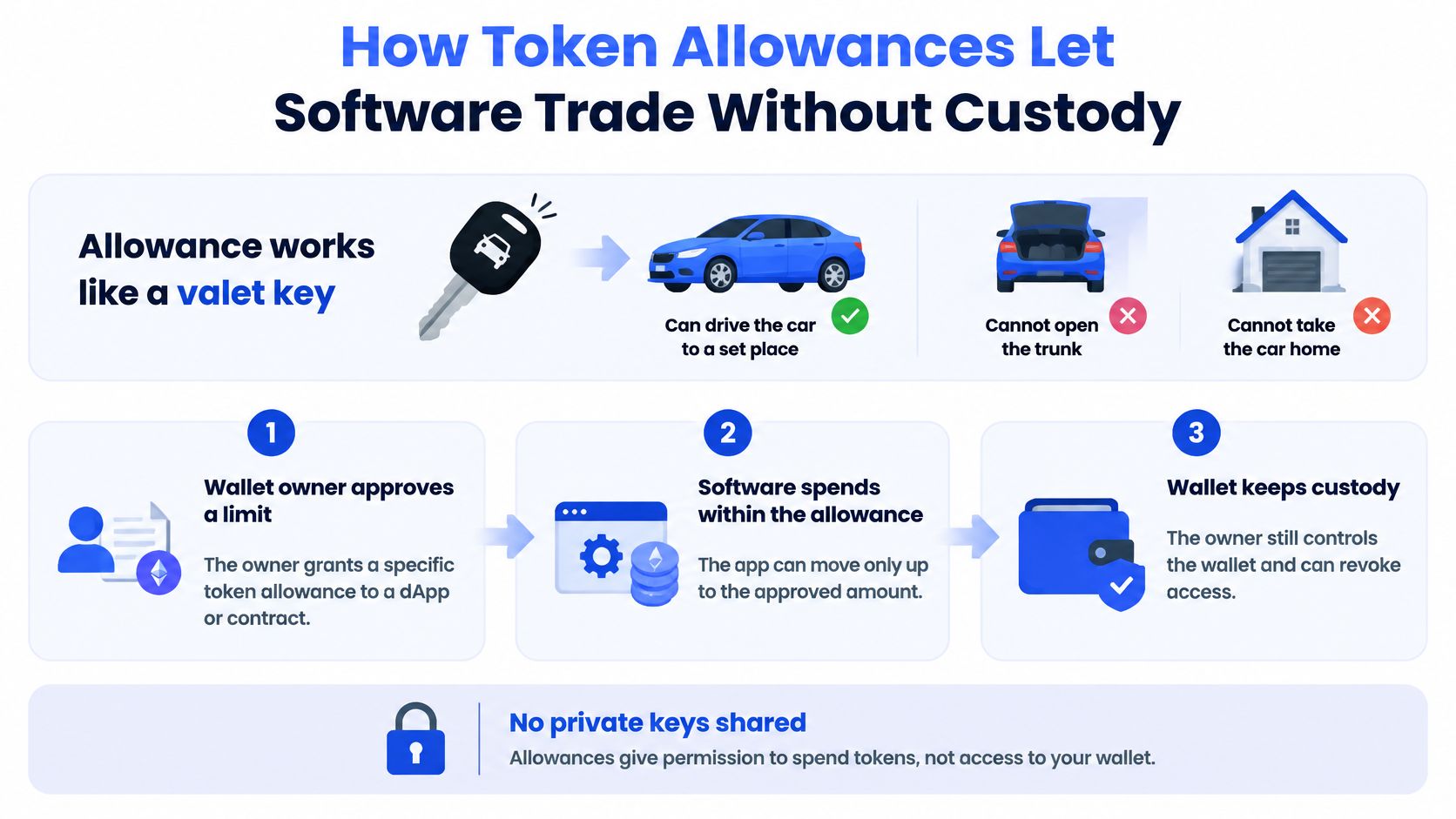
An allowance works like a valet key. It can drive the car to a set place. It can't open the trunk or take the car home.
The diagram below shows the split between keeping custody and granting a limited spend.
The three steps
First, the wallet owner signs an approval. It names one spender and one amount for one token. Second, that spender can move tokens up to that amount. Third, anyone can read the remaining allowance on chain at any time.
The ERC-20 standard defines this plainly. Its approve function lets a designated spender withdraw tokens from an owner's account multiple times, up to the approved amount. Its allowance function reports what's left. Calling approve again replaces the old allowance with the new value.
Say a wallet holds 2,000 USDC. It grants a spender a 500 USDC allowance on that token. The spender can move up to 500 USDC. It can't move 2,000. It can't touch the native asset. It can't touch other tokens in that wallet.
An unlimited approval is different. It stays usable until you change or revoke it. The cap is effectively your whole balance of that token, now and later. That's convenient for frequent trades. It's also the widest blast radius if that spender is compromised.
This is similar to app permissions on a phone. You grant access for a task, and you should know the scope before you tap allow. The plain language walkthrough of phone permissions explained for seniors makes the same general point for everyday apps. The habit transfers. Read the scope, not just the prompt.
The short video below walks through the approval flow visually.
Two limits matter. The allowance covers only the token and spender named in the approval. Exact behavior also depends on the token contract's implementation. The wallet owner keeps ownership throughout, and copyfomo cannot withdraw funds from your wallet.
Keep two numbers separate in your head. Your wallet balance is what you own. The allowance is what a contract is permitted to move. They are not the same figure.
Allowance Settings to Check Before Copy Trading
A permission you don't understand is the one that gets exploited. Run these checks before you enable unattended execution. Not after the first bad fill.
Allowance settings to verify before copying
| Setting | What to confirm | Safer default |
|---|---|---|
| Spender address | Matches the address given during setup, checked on the chain explorer | One verified address per chain |
| Token scope | Only the tokens the trader actually uses | Approve per token, not all tokens |
| Amount | Whether the limit is per trade or a global total | A capped amount, never unlimited |
| Expiry | Whether the approval ends on its own | An expiry where the wallet supports it |
| Chain | Which networks hold a live permission | Only the chains you actively trade |
| Revocation | How to set the allowance back to zero | Tested on a small amount before relying on it |
Start with the spender. Compare the address in the approval against the address you were given during setup. Check it character by character on the chain explorer. Never accept a spender address from a message, a chat, or an unfamiliar link.
Then check how the cap works. A fixed allowance sized to one trade limits each spend. A per trade cap limits size per copy but may allow many copies. A global cap limits total exposure until it's used up. Those behave very differently if a contract is compromised or a trader starts trading far more often than expected.
Practical rule: The right cap is the smallest one that still lets the setup run without constant reapprovals.
Approve only the tokens the trader uses. Approve only on chains you trade. Every extra token and chain is another live permission to monitor. The detail on sizing and related controls sits in the fomo copy trading settings guide.
Set a review cadence and keep it. Check allowances after any change in setup. Check after any pause. Check on a fixed schedule even when nothing looks wrong. Forgotten approvals don't announce themselves.
I would test revocation before I need it. Grant a small allowance. Revoke it. Confirm it reads zero. A kill switch you've never used is a theory, not a control.
Risks a Non Custodial Wallet Does Not Remove
Non custodial does not mean low risk. It lowers counterparty risk. It doesn't remove market risk, permission risk, or copy trading risk.
The 2025 report from the International Organization of Securities Commissions warns that online imitative trading can expose retail investors to significant losses, including losses associated with borrowed products and returns eroded by frequent trading fees. It also notes that easy automatic copying can encourage inexperienced investors to take excessive risks.
What copying cannot control
- Market volatility: Prices move between the source trade and your fill.
- Execution differences: Your price, size, and timing won't match exactly.
- Slippage: Thin liquidity takes its cut on entry and exit.
- Fees: Frequent copying stacks network and trading costs.
- Token specific risk: A token can break, pause, or lose liquidity.
- Losses on the copied position: Mirroring copies losing trades too.
Leaderboards add another limit. Rankings reflect past realized PnL. Research on social trading in an ACM study of investor behavior and rankings found rankings can be gamed, and noted a promoted portfolio that later produced losses exceeding USD 15,000 over ten days. A top rank is historical data. It isn't a forecast.
Device security sits underneath all of this. Malware on the machine that holds your wallet can alter addresses, capture phrases, or push malicious signatures. If you suspect an infection, work through steps to clear hidden malware persistence before you sign anything else. Don't trade from a device you don't trust.
State it plainly. Copy trading carries risk and isn't a guarantee of profit. Past performance does not predict results. The fuller breakdown of copy trading risks is worth reading before you size up.
You still control useful levers. Trade size. Caps. Which trader you follow. When to pause. When to revoke. Use them. Custody gives you those controls, but it won't pull them for you.
How to Revoke an Allowance and Withdraw Your Funds
Revoking and withdrawing are separate actions. Revocation removes the right to spend. Withdrawal moves the assets. Do them in the right order.
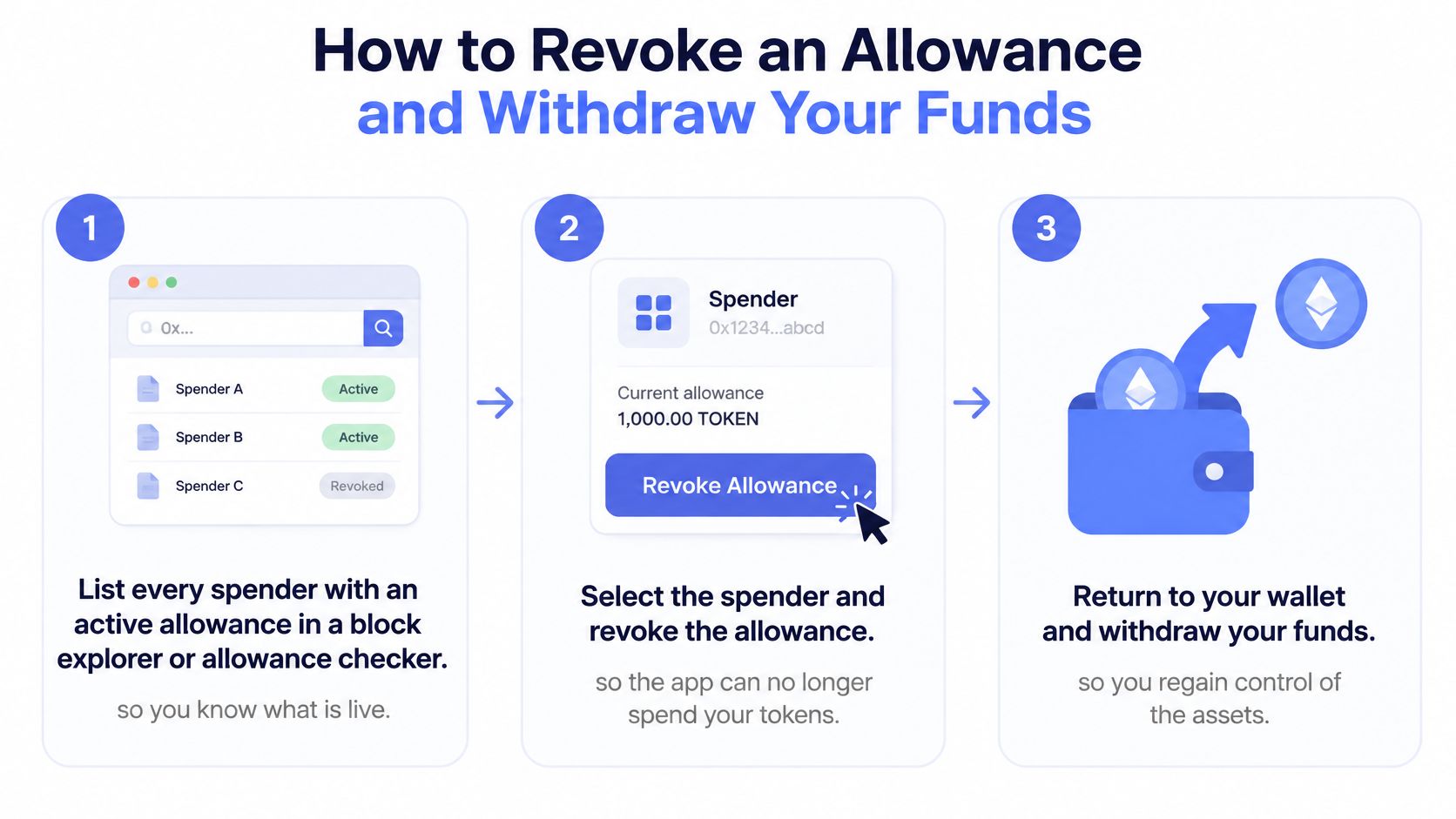
The graphic below compresses the flow into the order that matters.
The procedure
- List every live spender: Use a block explorer or allowance checker. You need to know what's active before you change anything.
- Identify the copy trading spender: Note its token, amount, and chain. The same spender on another chain is a separate permission.
- Pause new copies first: This stops new trades running while you work.
- Submit a zero allowance: Send a new approval for that spender and token with the amount set to zero. Expect a network fee.
- Verify the result: Check the allowance now reads zero on that same chain. Don't rely on the wallet prompt alone.
- Move the balance yourself: Send each token directly to a wallet you control. Each move is its own on-chain transfer.
- Leave unsellable positions noted: If a position can't be sold, it stays in your wallet. Revoking doesn't change what the wallet holds.
Guidance in NOWNodes' token approvals explainer matches this. Token approvals generally remain active until changed or revoked, and removing an ERC-20 spender's permission means submitting a new approval with a zero allowance. That revocation is itself an on-chain transaction that requires a network fee.
One operational detail matters for stuck tokens. Tokens that cannot be sold stay in your wallet, the verdict is re-tested every few hours, and the position comes back if a route becomes available. Revoking an allowance doesn't liquidate anything. It doesn't move anything either.
Ending access does not move your balance. If you want funds elsewhere, you still have to send them.
Timing and cost depend on the network. A busy chain costs more and confirms slower. That's another reason to practice revocation with a small amount while things are calm. You don't want your first attempt to happen during a drawdown, on an unfamiliar explorer, with the wrong chain selected.
Confirm Your Setup Before You Enable Copying
Before enabling unattended copying, be able to identify the spender, token scope, and revocation path. Confirm the spender address, allowance cap, and chains. Then test revocation with a small amount and check that the allowance is zero on-chain.
Where to check before you start
Review each trader's realized PnL and ranking on the public fomo leaderboard before you copy anyone, and check the public metrics in copyfomo's dataroom rather than trusting a screenshot. For more on wallet security, read the existing /blog posts.
You can assess a trader without copying. Get alerts on any trader card without copying, with no sizing, no fee, and no wallet needed. Watch entries and exits to understand trading frequency and sizing before you decide whether to copy.
When ready, start the bot on Telegram through the copyfomo start page with a small trade size. Compare each copied trade with the source trader's activity in the feed. Pause copying if fills, sizes, or tokens differ from your settings.
A small starting size checks the full setup: wallet, allowance, trade sizing, and mirrored exits. Confirm each behaves as configured before increasing size.
Copy trading carries risk, and past performance does not predict results. Non-custodial design lowers counterparty risk, but permission and trading risks remain yours. Keep control of your allowance and decide when to stop.
copyfomo mirrors entries and exits from traders on the fomo leaderboard into your wallet through a revocable allowance. Set your trade size, check the spender and caps, and test the setup before increasing your exposure. Start the bot on Telegram at copyfomo.
stop reading. start copying.
pick a trader from the fomo leaderboard, set your size, and the entries and the exits land in your own wallet while you sleep.
open copyfomo on telegram →