Find Crypto Wallet Address Without the Wrong One
find crypto wallet address in an app, on an explorer, or from a handle, then verify the full string so a lookalike does not receive the funds.
The usual advice is to copy an address from a recent transfer, a block explorer, or a screenshot. That finds a string. It doesn't prove the string belongs to the person you mean to follow, and a convincing lookalike can send funds to the wrong wallet.
Check the chain, compare the full address, and look for on-chain behavior that fits the trader before you send or copy. Finding an address and authenticating its owner are separate jobs.
Table of Contents
- What a Public Wallet Address Actually Is
- Chain Formats to Match Before You Copy
- How to Find a Crypto Wallet Address
- Stop an Address Poisoning Lookalike
- What a Found Address Reveals About You
- Confirm the Wallet Before You Copy Trades
What a Public Wallet Address Actually Is
A wallet address isn't the wallet's contents. It's a public string used to receive assets or look up activity on a blockchain. The wallet stores private keys or passcodes that control assets recorded on-chain. The SEC's investor guidance on crypto assets makes this distinction clear: wallets store private keys, not the crypto assets themselves.
Finding an address doesn't give you ownership or permission to spend. Anyone can look up a public address on a blockchain explorer. Signing a transaction requires its private key or another authorized mechanism. Never give a private key or recovery phrase to a person, bot, or website that offers to find an address for you. For a lookup, you need only the public string.
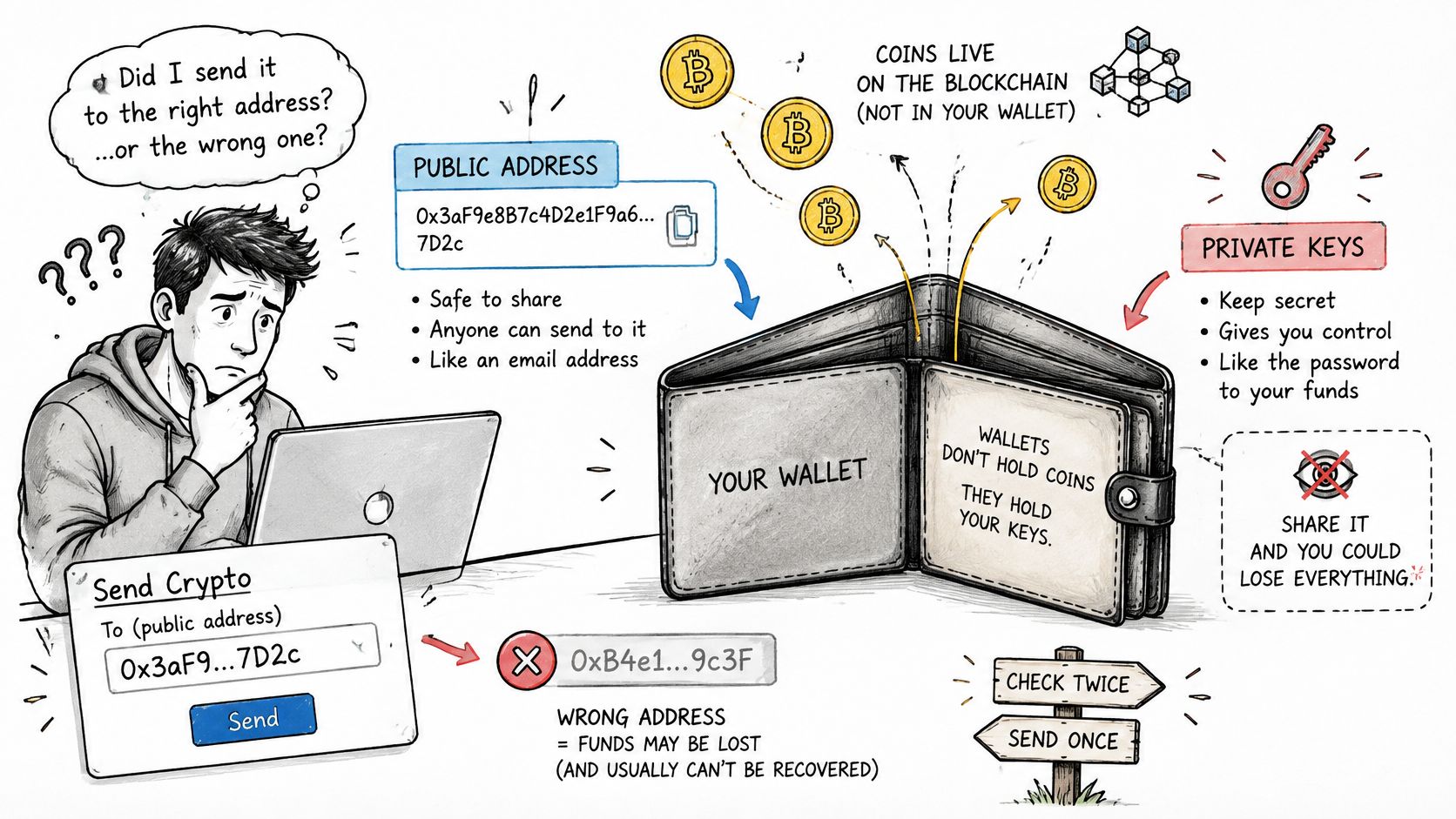
Three common sources provide different kinds of information. Your wallet's Receive or account screen gives you an address controlled by that wallet. An explorer shows public history for an address you already have. A trader handle or profile screenshot offers a candidate string, not proof of who controls it.
Those distinctions matter when you find a crypto wallet address to follow from fomo. First check that the format matches the chain. Then look up the address and compare its public activity with what you know about the trader. A screenshot, handle, or leaderboard entry can point you toward an address, but it shouldn't settle the question. The same caution applies after you identify an address: linking it to a name can expose its public history.
Chain Formats to Match Before You Copy
Finding a string is easy. Establishing that it belongs to the trader you intend to copy takes more than matching its shape. Check the chain, compare the full address, and review its public activity before sending or copying.
| Chain | What the string looks like | Check before use | Common mix-up |
|---|---|---|---|
| Ethereum and other EVM chains | 0x plus 40 hexadecimal characters |
EIP-55 mixed case can catch many accidental typos, but is not a full checksum | The same 0x account has a different balance on each EVM chain |
| Bitcoin legacy P2PKH | Starts with 1 |
Check the character set and address validity | It isn't a bc1 or 0x string |
| Bitcoin P2SH | Starts with 3 |
Check the character set and address validity | Easy to confuse with a legacy 1 address |
| Bitcoin native SegWit | Starts with bc1 |
Preserve the format and check the address validity | A missing prefix or altered string can invalidate it |
| Solana | Case-sensitive Base58 string, commonly 32 to 44 characters | No 0x; preserve case |
An EVM 0x string isn't a Solana address |
A format check catches obvious mistakes. It does not prove who controls an address or replace a full-string comparison. Match the chain first, then check the prefix, length, and any chain-specific checksum.
Ethereum addresses are 20-byte values, commonly written as 0x followed by 40 hexadecimal characters. EIP-55 mixed-case encoding uses capitalization to provide a checksum signal. It can catch many accidental typos, but it is not a complete guarantee that an address is correct. Some wallets and services also accept lowercase addresses, so compare every character against the original rather than relying on capitalization alone.
Why the chain matters
The same EVM address can exist on Ethereum, Base, Arbitrum, and other EVM chains. Balances and tokens remain on their respective networks. Select the network that matches the intended transfer or trading activity.
Bitcoin prefixes help distinguish address formats, but a familiar prefix alone does not confirm that an address is valid or suitable for a transaction. Solana addresses use case-sensitive Base58, so changing a letter's case changes the string.
Practical rule: Match the chain, then check the prefix and length. For Ethereum, check the EIP-55 case and compare the complete address.
A plausible-looking string can still point to the wrong wallet. Before sending funds or starting a copy workflow, verify the chain and compare the full address character by character.
How to Find a Crypto Wallet Address
The address string is easy to find. Proving it belongs to the person you intend to pay or copy takes more work. Start with an authenticated source, then compare the full address and its on-chain behavior before sending funds or copying trades.
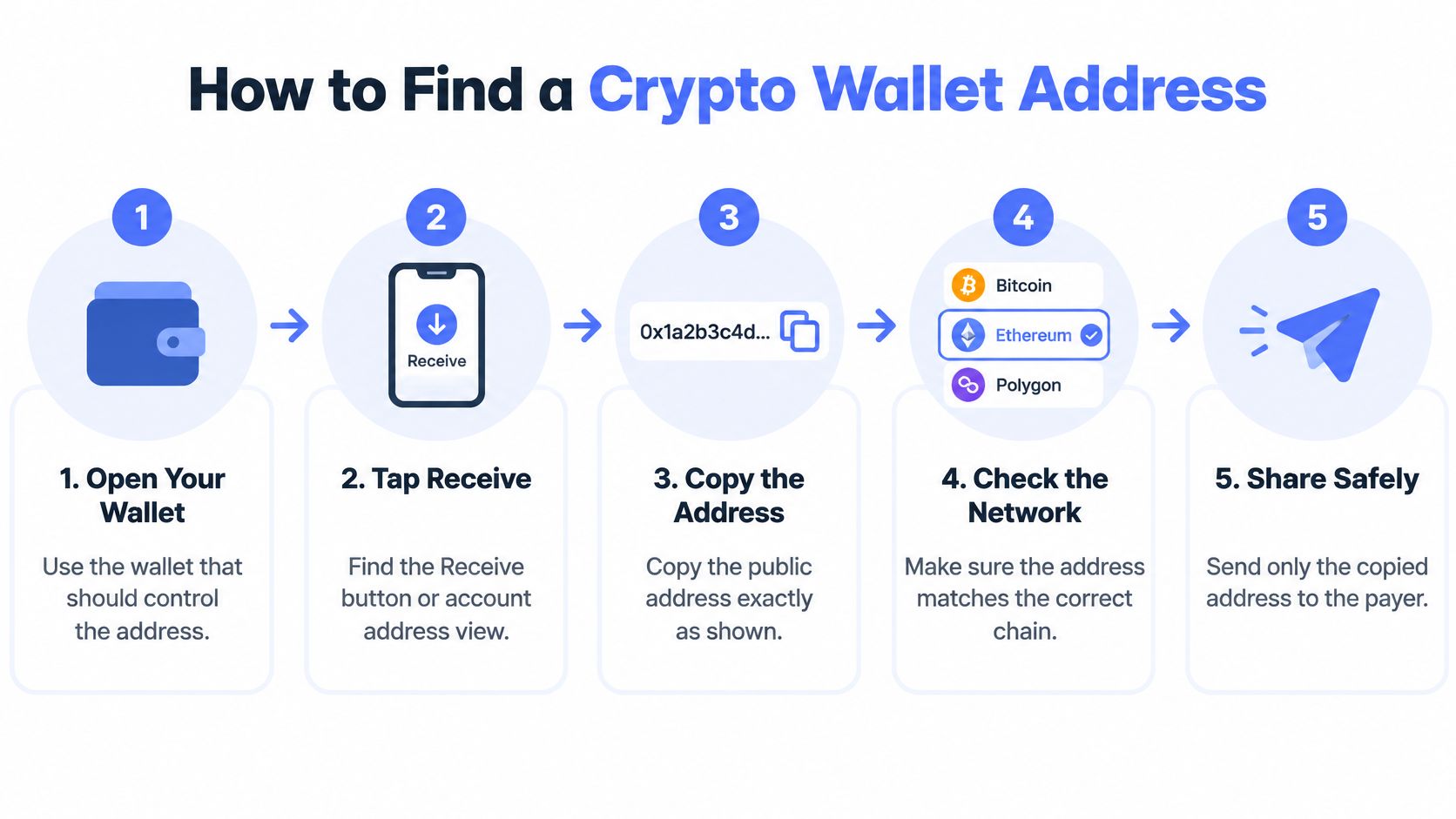
Use this five-step lookup
Open the wallet that should control the address. Select its account or address screen. A transaction-history row may show an address you interacted with, not your own receive address.
Open Receive. Copy the address shown for the intended network. In copyfomo, your trading wallet has one address for every EVM chain and a separate address for Solana. Label the chain before leaving the screen.
Copy the complete string. Don't shorten or retype it. A missing character can make an address invalid. A substituted character can send funds somewhere else.
Check the network and public record. If you have someone else's address, search for it in an explorer on the relevant chain. Explorer documentation covers public address, transaction, and block records across Bitcoin, Bitcoin Cash, Ethereum, and Solana. A lookup can show transfers, transaction IDs, block placement, and network history. It cannot reveal a private key or prove who controls the address. An empty result may mean you selected the wrong chain. The Blockchain.com Explorer documentation describes access to public blockchain records, not wallet credentials.
Check the person before saving the address. A trader's handle or profile screenshot gives you a candidate to verify. Compare the full address character by character, then check whether its on-chain activity matches the trader. If the identity remains uncertain, don't save or copy it. For a QR code, scan it in your wallet app from a source you trust, not from a forwarded image that could have been replaced.
| Source | What you get | What it doesn't prove |
|---|---|---|
| Receive or account screen in your wallet | The public address that wallet controls | Anyone else's identity |
| Block explorer lookup | Public transfers, balances, and transaction IDs | A private key or the owner's name |
| Trader handle or profile screenshot | A candidate string to check | That the wallet is really theirs |
| Recent transfer or address book | An address you interacted with before | That the row wasn't planted by a lookalike |
For account and payment security beyond wallet addresses, read the Digital Footprint Check security guide. To examine public trading activity, this guide to tracking crypto wallets explains what wallet activity can and cannot establish.
Finding a string and proving it belongs to the intended person are separate checks. Do both before you send funds or copy trades.
Stop an Address Poisoning Lookalike
A recent-transfer list can be a trap. Address-poisoning attacks place lookalike addresses in a wallet's transaction history. The fake may resemble a trusted address at the beginning and end, tempting someone to copy it later without checking the characters in between.
A 2025 academic study identified 270 million poisoning attacks across Ethereum and BNB Smart Chain over two years, affecting 17 million victims and causing at least $83.8 million in losses, according to the study's coverage of address-poisoning risks. That's why an explorer result or a familiar-looking recent transfer isn't enough. Those sources can help you inspect an address, but they don't authenticate who placed it there.
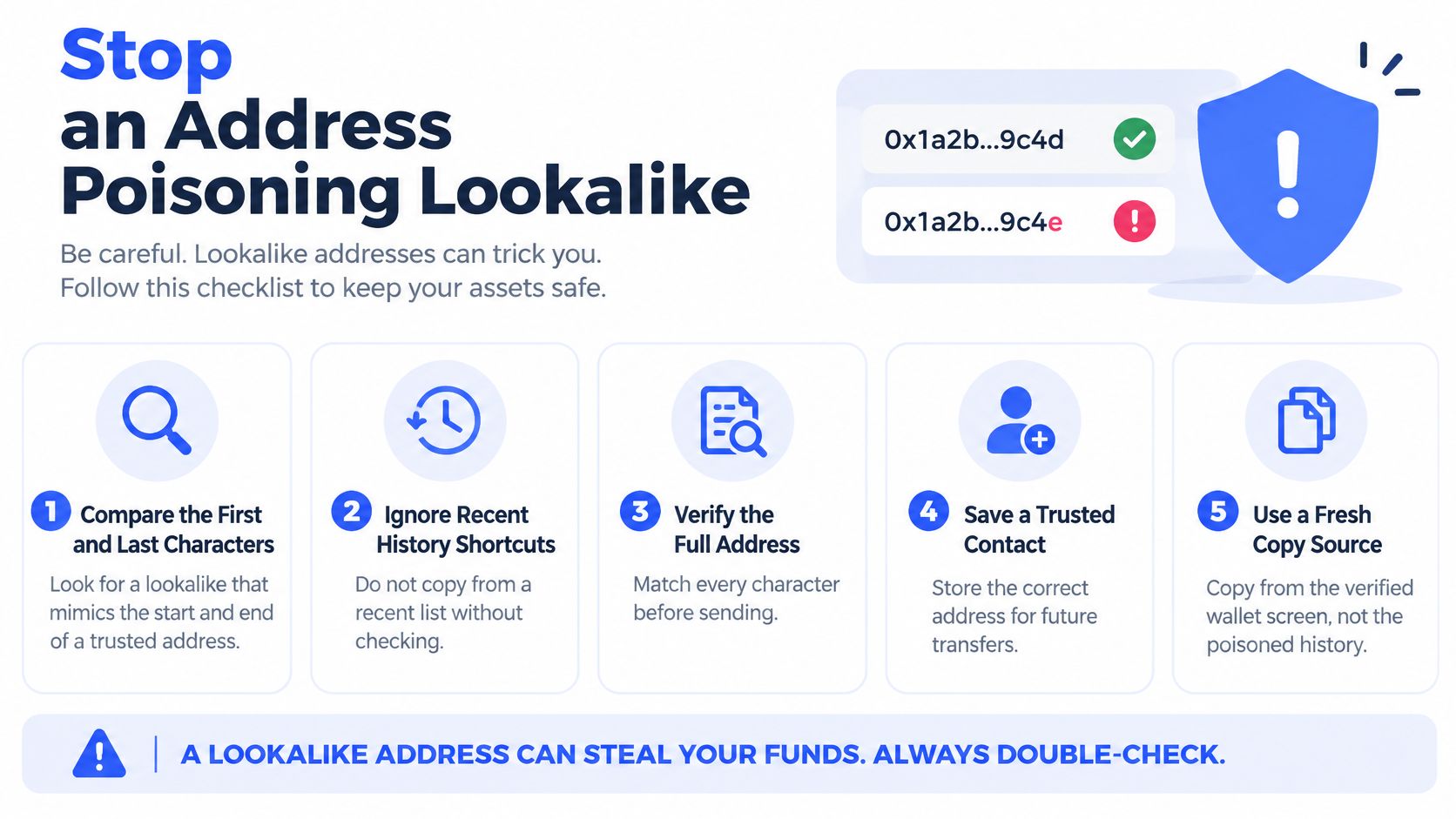
Verify in this order
- Start from an authenticated source. Use a receive screen, a signed message, or a profile you opened yourself. Don't rely on a reply, an unsolicited direct message, or a forwarded screenshot.
- Compare the entire address. Wallets often truncate what they display. Check every character against the authenticated source, including the middle of the string. Matching first and last characters doesn't establish a match.
- Confirm the chain and token standard. A correct-looking address on the wrong network can still lead to a failed or misdirected transfer. Confirm both the destination chain and the asset standard before sending.
- Use a small test transfer only with independent confirmation. A test can help for a transfer where it makes sense, but check arrival through a trusted source other than the same potentially poisoned history. The test itself doesn't prove that a later copy from transaction history will be safe.
- Save the verified address. Add the full string to an address book or allowlist, label the chain, and use that saved entry next time. Don't return to a recent-transfer row just because it's convenient.
For copytraders, a visible leaderboard address or profile screenshot is a lead, not proof of control. Check whether the full address and its public behavior fit the trader you mean to follow. If they don't, stop. Don't choose the closest-looking address or guess from a truncated display.
What a Found Address Reveals About You
Finding an address string is easy. Knowing what it reveals is the harder part. Transfers and balances tied to a used address are visible on-chain. If someone connects that address to you through an exchange, social profile, screenshot, or leaderboard, they can associate its transaction history with your identity.
Repeated use makes activity easier to group. Publishing or reusing an address can expose balances, counterparties, timing, and trading patterns. A valid address can still be the wrong choice to share or reuse.
The same risk applies to copytrading. If you mirror trades through a wallet already linked to you, your own activity may be easier to identify. Keep public trading separate from wallets holding personal or longer-term assets if you want to limit those connections.
Address handling matters beyond finding a string. A wallet used for one purpose can reveal more than intended when its address is shared or reused.
Keep addresses compartmentalized
- Label the chain. Record the network alongside the address, not just the string.
- Separate public and personal use. Don't publish a receiving address that also holds assets you don't want linked to your public identity.
- Review before sending. Check the destination and network on the final confirmation screen.
- Stop reusing an exposed address. If it is already tied to your name, use a different address for activity you want kept separate.
A wallet address is a public identifier. Decide what activity you are comfortable making easy to connect before sharing or reusing it. This guide to tracking crypto wallets explains how public activity can be interpreted, beyond locating an address.
Confirm the Wallet Before You Copy Trades
A wallet string can be valid and still belong to the wrong trader. Before copying, check the chain format, compare the full address with an authenticated source, and confirm that its on-chain activity fits the trader. If those checks do not line up, do not guess.
copyfomo's /find flow identifies a trader's wallet from their handle or profile screenshot, checks that it is really theirs, and refuses to save a match if it cannot confirm it. Full wallet addresses are available in Telegram. You do not need to share a seed phrase.
copyfomo mirrors a chosen trader's buys and sells into your wallet at your configured size. It is non-custodial: you keep your keys and grant a trading allowance that you can revoke. Review the contract, token, network, and spending limit before approving access. Revoking an allowance requires a wallet transaction and network fee, and does not erase earlier blockchain activity. For the steps after checking a trader, see how to copy trade.
To start, send /start to @copyfomo_bot. Choose a trader with /leaderboard or /find, run the copy flow, and fund your wallet with /deposit. /leaderboard shows followed wallets and their 24-hour, 7-day, and 30-day PnL. The public copyfomo data provides service metrics.
Copy trading carries risk. Prices, slippage, liquidity, and timing can differ from the source trader, and copied trades can lose money. No outcome is guaranteed. For a different kind of transfer, a guide to requesting a Bitcoin betting payout covers a sportsbook withdrawal process.
copyfomo runs as a Telegram bot. Check the full address and its on-chain behavior before you copy or send funds.
stop reading. start copying.
pick a trader from the fomo leaderboard, set your size, and the entries and the exits land in your own wallet while you sleep.
open copyfomo on telegram →